
Better Navigation Debug Info
Better Navigation Debug Info is a tool to understand what is going on "under the hood" in the Better Navigation System during gameplay.
You can open it through Tools -> Better UI -> Debug -> Navigation.
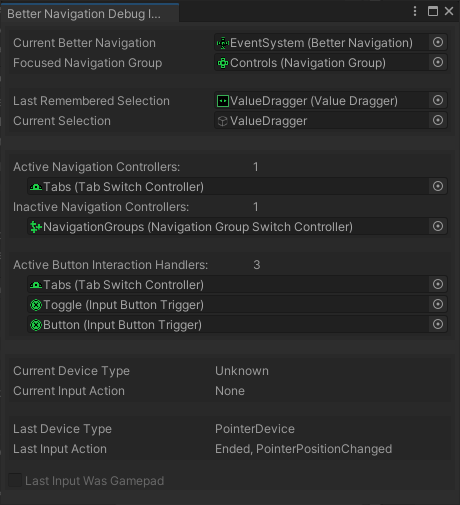
Fields
- Current Better Navigation
The currently active Better Navigation component. This should always the one that is on the same game object as the current Event System. - Focused Navigation Group
The one Navigation Group that is currently focused. It can happen that there is no navigation group focused (in that case, the Root Selectables of Better Navigation are used) - Last Remembered Selectable
The Current Selectable or the one that was lastly active. This should always have a value. - Current Selection
The Game Object of the Current Selectable as stored in the Event System. This can become null when the user clicks somewhere with the mouse. - Active Navigation Controllers / Inactive Navigation Controllers
Lists of all Navigation Group Switch Controllers and Tab Switch Controllers that are currently active or inactive respectively. - Active Button Interaction Handlers
All controls that support button shortcuts other than "submit". These are Input Button Triggers as well as Navigation Group Switch Controllers and Tab Switch Controllers - Current Device Type
The Type of device that is currently used. "Unknown" for as long as the user doesn't do any input. "PointerDevice" for mouse and touch. "DirectionDevice" for Gamepad and Keyboard. - Current Input Action
The Input Action that is currently detected, including modifiers like "Begin", "Ended", "Repeated" - Last Device Type
The Type of device that is currently used or was used last.. - Last Input Action
The Input Action that is currently detected or that was detected last, including modifiers like "Begin", "Ended", "Repeated" - Last Input Was Gamepad
true when the Last Device Type not only was a "DirectionDevice" but specifically a Gamepad (and not a Keyboard)